> Reply in English, and write any code comments in English.
# Task: make my website readable to AI search engines
Act as an engineer specialized in technical SEO and GEO (generative engine optimization: ChatGPT Search, Claude, Perplexity, Google AI Overviews, Copilot).
## Context
- Site analyzed: http://harborcyclery.example/
- Analysis date: 24/09/2026
- Current AI visibility score: 36/100 (grade F)
- Human/AI parity: a visitor sees 160 words while an AI crawler receives 0 (0%).
- Current title: "Harbor Cyclery"
- Structured data present: none
## Score by area
- AI crawler access: 83/100
- Content visible to AI: 15/100
- Structure and semantics: 25/100
- Structured data: 14/100
- Answer-ready content: 5/100
- Technical: 71/100
## Who you compete against
Facing the same question, an AI picks among these sites. The numbers come from a real analysis using the same criteria:
- bristolbikeworks.example: 79/100, 588 readable words
- quaysidecycles.example: 55/100, 231 readable words
- harborcyclery.example (my site): 36/100, 0 readable words
## What I need you to do
Fix the problems listed below **in the order they appear** (they are sorted by real impact on whether an AI can cite me at all).
For each problem:
1. Find the file or template in my project where it originates.
2. Apply the change adapted to my actual stack (do not copy the examples literally — use them as reference).
3. Tell me in one sentence what you changed and why.
4. Tell me how to verify it worked.
If something requires a business decision (prices, marketing copy, real contact details), don't make it up: ask me.
## Blockers (nothing else matters until these are fixed)
### 1. The AI only sees 0% of your site
**Severity:** Critical
**What is happening:** A person reads 160 words on screen; an AI crawler receives 0. The difference is content generated in the browser.
**Why it matters:** When a model decides who to cite, it compares the content it managed to read. If half your page is missing, you compete with half your arguments.
**What to do:**
Move the main content to server-side rendering: copy, prices, product details, FAQs and navigation links. Leave only the interactive parts (carts, filters, maps) to the client.
### 2. Only 0 words reach the AI
**Severity:** Critical
**What is happening:** The HTML returned by the server contains 0 words of real text, against the 160 a person sees on screen.
**Why it matters:** Models need text to extract an answer and cite you. With under 300 words they have little to work with.
**What to do:**
Render the content on the server (SSR/SSG) or pre-render the HTML: the AI has to receive the text already written in the response, not an empty container.
### 3. There is content the AI never gets to read
**Severity:** Critical
**What is happening:** These texts are visible on screen but aren't in the HTML a crawler receives:
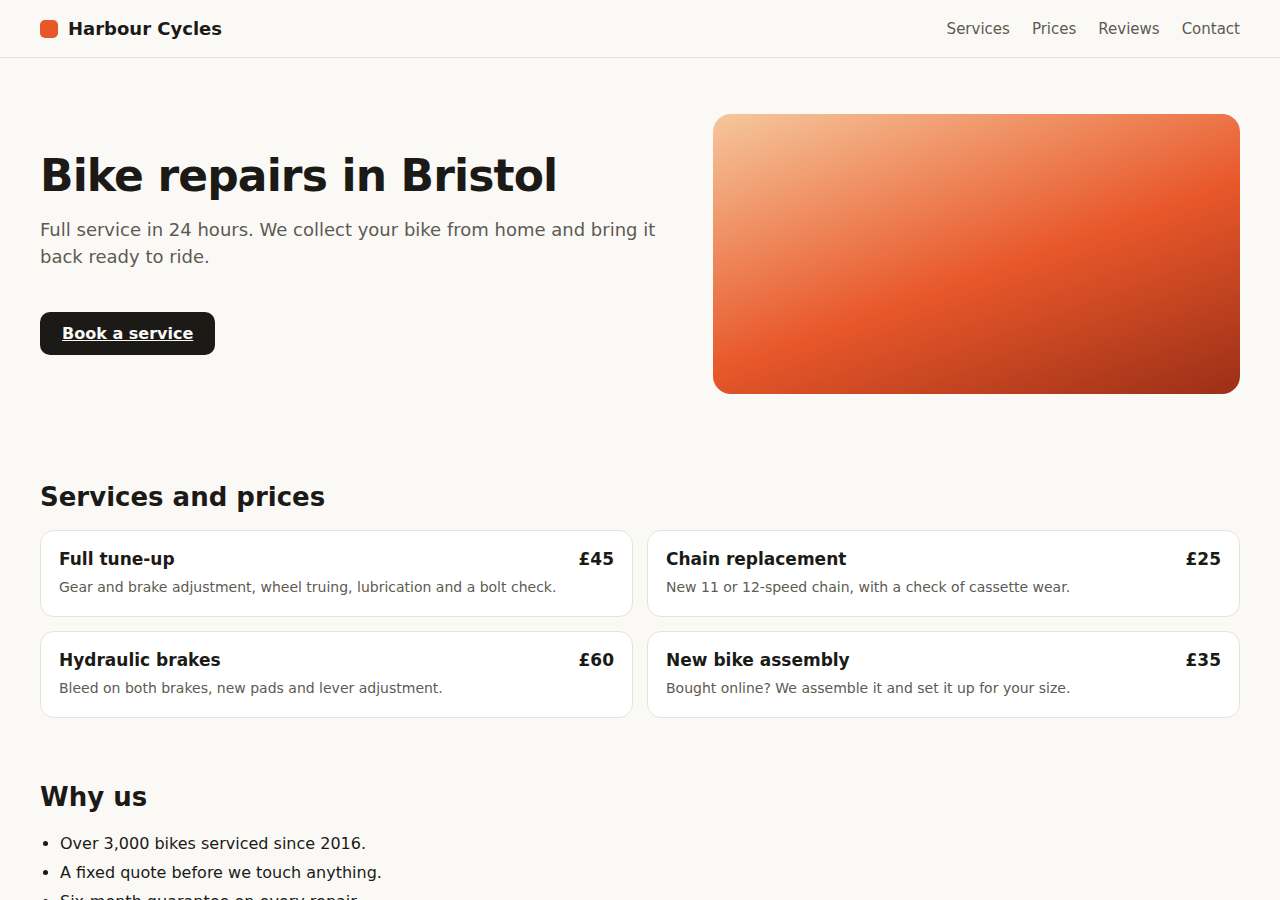
• Bike repair in Portland
• Full service in 24 hours.
• We collect your bike from home and bring it back ready to ride.
• Gear and brake adjustment, wheel truing, lubrication and a bolt check.
• New 11 or 12-speed chain, with a check of cassette wear.
• Bleed on both brakes, new pads and lever adjustment.
• We assemble it and set it up for your size.
• Over 3,000 bikes serviced since 2016.
**Why it matters:** GPTBot, ClaudeBot and PerplexityBot read the HTML as it arrives. They don't wait for your JavaScript to run. Everything above is literally invisible to them.
**What to do:**
Serve that content from the server. Depending on your stack:
• Next.js: use Server Components or getStaticProps/generateStaticParams instead of useEffect + fetch.
• Nuxt: ssr: true and useAsyncData instead of onMounted.
• Plain React/Vue SPA: add pre-rendering (vite-plugin-prerender, react-snap) or move to SSR.
• CMS with JS widgets: replace the widget with static HTML or put the text in the content itself.
Check the result with: curl -s http://harborcyclery.example/ | grep -i "a chunk of the text"
<details><summary>Snippet found on the site</summary>
```
Bike repair in Portland
---
Full service in 24 hours.
---
We collect your bike from home and bring it back ready to ride.
---
Gear and brake adjustment, wheel truing, lubrication and a bolt check.
---
New 11 or 12-speed chain, with a check of cassette wear.
```
</details>
## Important
### 1. No H1 heading
**Severity:** High
**What is happening:** The raw HTML contains no <h1>.
**Why it matters:** The H1 tells the model the main topic. Without it (or with several), the page loses focus and the model doesn't know what it is summarizing.
**What to do:**
Add a single <h1> with the page's main topic, phrased the way a customer would say it.
### 2. The page has no headings
**Severity:** High
**What is happening:** No H1-H6 was found in the served HTML.
**Why it matters:** Headings are the cut points a model uses to slice the page into quotable fragments. Without them your content is a wall of text and gets quoted whole or not at all.
**What to do:**
Structure the content with one H1 and several H2/H3, each phrased as the question that section answers.
### 3. You have no structured data
**Severity:** High
**What is happening:** The HTML contains no <script type="application/ld+json"> with schema.org.
**Why it matters:** JSON-LD is the identity card a model reads without ambiguity: name, services, prices, opening hours, ratings. Without it the AI has to guess from the text, gets it wrong more often, or ignores you and cites whoever made it easy.
**What to do:**
Add a block like this to the <head>, adjusting the values to your business:
<script type="application/ld+json">
{
  "@context": "https://schema.org",
  "@type": "Organization",
  "name": "YOUR BRAND",
  "url": "http://harborcyclery.example",
  "logo": "http://harborcyclery.example/logo.png",
  "description": "What you do, for whom and where, in one sentence.",
  "sameAs": ["https://www.linkedin.com/company/…", "https://www.instagram.com/…"],
  "contactPoint": {
    "@type": "ContactPoint",
    "contactType": "customer service",
    "email": "hello@harborcyclery.example",
    "availableLanguage": ["en"]
  }
}
</script>
### 4. The site doesn't use HTTPS
**Severity:** High
**What is happening:** http://harborcyclery.example/ is served without encryption.
**Why it matters:** Without HTTPS you lose ranking in classic search engines and several crawlers discard the domain outright as a trustworthy source.
**What to do:**
Install a TLS certificate (Let's Encrypt is free), redirect all HTTP traffic to HTTPS with a 301, and enable HSTS.
## Additional improvements
### 1. No sitemap.xml
**Severity:** Medium
**What is happening:** http://harborcyclery.example/sitemap.xml doesn't respond and robots.txt declares none.
**Why it matters:** Without a sitemap, a crawler only finds what is linked from the home page. Deep pages — exactly the ones answering specific questions — never get indexed.
**What to do:**
Generate a sitemap.xml with every public URL and its real <lastmod>, publish it at http://harborcyclery.example/sitemap.xml and declare it in robots.txt with the line:
Sitemap: http://harborcyclery.example/sitemap.xml
### 2. No alternative content without JavaScript
**Severity:** Medium
**What is happening:** The page depends on JS and has no <noscript> carrying the essential content.
**Why it matters:** While you fix server-side rendering, a proper <noscript> gives the AI at least the main text instead of nothing.
**What to do:**
As a temporary patch, put the headline, the two or three key paragraphs and the main links inside <noscript>. The real fix is still serving rendered HTML.
### 3. The title isn't optimized
**Severity:** Medium
**What is happening:** The <title> is 14 characters long: "Harbor Cyclery".
**Why it matters:** The title is the first signal a model reads to decide what the page is about and whether it answers the user's question.
**What to do:**
Write a 50-60 character title shaped like "What you offer | Brand", using the words your customer would type when asking an AI.
<details><summary>Snippet found on the site</summary>
```
Harbor Cyclery
```
</details>
### 4. Missing meta description
**Severity:** Medium
**What is happening:** The HTML has no <meta name="description">.
**Why it matters:** Many AI systems use the description as the reference summary of the page before reading the body.
**What to do:**
Add a 140-160 character description answering in one sentence what you do, for whom and where:
<meta name="description" content="…">
### 5. The page doesn't use semantic HTML
**Severity:** Medium
**What is happening:** There is no <main>, <article>, <nav> or <header>: everything is a <div>.
**Why it matters:** Semantic tags tell the extractor which part is content and which is menu or footer. Without them your text mixes with navigation and the model quotes you worse.
**What to do:**
Wrap the main content in <main>, each self-contained piece in <article>, the menu in <nav> and the footer in <footer>. It is swapping divs for tags with meaning, without touching styles.
### 6. No links in the served HTML
**Severity:** Medium
**What is happening:** The document contains no <a href>.
**Why it matters:** If navigation is generated with JavaScript, an AI crawler can't find the rest of your site: it only indexes this isolated page.
**What to do:**
Serve the menu as real <a href> links in the HTML, not as buttons with onClick.
### 7. The AI doesn't know who you are
**Severity:** Medium
**What is happening:** There is no schema of type Organization, LocalBusiness or Person.
**Why it matters:** AIs recommend entities, not loose URLs. If you don't declare name, scope and contact details, they don't associate you with your sector or your city.
**What to do:**
Add an Organization block (or LocalBusiness if you serve customers at a physical address) with name, url, logo, description, sameAs with your social profiles and, where relevant, address and areaServed.
### 8. Your subheadings don't answer the questions people ask
**Severity:** Medium
**What is happening:** The page has no H2/H3 subheadings.
**Why it matters:** AIs look for the chunk of text that literally answers the user's question. An H2 reading "Our services" matches nothing; "How much does a bathroom renovation cost in Valencia?" matches a real question.
**What to do:**
Rewrite at least 3 subheadings as the exact question a customer would ask, and answer in the first paragraph below in 2-3 sentences. Example: "## How long does a bathroom renovation take?" followed by "Two to three weeks for a standard 5 m² bathroom…".
### 9. No direct answer in the opening lines
**Severity:** Medium
**What is happening:** The page starts without a paragraph summarizing what it is about.
**Why it matters:** A model usually quotes the first 40-60 words that answer the query. If you open with marketing filler, it has nothing to extract.
**What to do:**
Open the page with a 40-70 word paragraph that answers literally: what it is, for whom, how much it costs or how long it takes. Save the flourishes for later.
### 10. No frequently asked questions block
**Severity:** Medium
**What is happening:** No frequently asked questions section was detected.
**Why it matters:** A marked-up FAQ is the question-answer format AI engines consume directly: each pair is an answer ready to serve with your brand next to it.
**What to do:**
Add 5-8 real customer questions with their answers (2-4 sentences each) and mark them up like this:
<script type="application/ld+json">
{
  "@context": "https://schema.org",
  "@type": "FAQPage",
  "mainEntity": [{
    "@type": "Question",
    "name": "How much does the service cost?",
    "acceptedAnswer": {"@type": "Answer", "text": "From 300 € for a standard project…"}
  }]
}
</script>
Use the questions you already get by email or WhatsApp: those are the ones people type into an AI.
### 11. No llms.txt file
**Severity:** Low
**What is happening:** http://harborcyclery.example/llms.txt doesn't exist.
**Why it matters:** llms.txt is an emerging standard (not every engine uses it yet) for telling a model which of your pages matter and in what order to read them. It takes ten minutes and positions you for when it becomes common.
**What to do:**
Create http://harborcyclery.example/llms.txt in Markdown:
# harborcyclery.example

> One sentence describing what your business does and who it serves.

## Main pages
- [Services](http://harborcyclery.example/services): what you offer, precisely.
- [Pricing](http://harborcyclery.example/pricing): rates and plans.
- [Contact](http://harborcyclery.example/contact): how to hire you.
### 12. Missing Open Graph metadata
**Severity:** Low
**What is happening:** Missing: og:title, og:description, og:image.
**Why it matters:** Several assistants use Open Graph as a quick summary when they show your link inside an answer.
**What to do:**
Add to the <head>:
<meta property="og:title" content="…">
<meta property="og:description" content="…">
<meta property="og:image" content="http://harborcyclery.example/cover.jpg">
<meta property="og:url" content="http://harborcyclery.example/">
<meta property="og:type" content="website">
### 13. Missing the share card for your links
**Severity:** Low
**What is happening:** No <meta name="twitter:card"> was found.
**Why it matters:** When someone pastes your link into X, Slack, WhatsApp or Discord, a card-less link shows up as a line of gray text nobody clicks. With an image it takes ten times the space and gets shared far more.
**What to do:**
Add to the <head>:
<meta name="twitter:card" content="summary_large_image">
<meta name="twitter:title" content="…">
<meta name="twitter:description" content="…">
<meta name="twitter:image" content="http://harborcyclery.example/twitter-image.png">
The image must be 1200×630 px. On Next.js you can generate it from code with an opengraph-image.tsx and a twitter-image.tsx file, so it never goes stale.
### 14. Missing canonical URL
**Severity:** Low
**What is happening:** The page doesn't declare <link rel="canonical">.
**Why it matters:** Without a canonical, the same content served at several URLs (with and without www, with parameters, http and https) counts as different pages and your authority is split across all of them.
**What to do:**
Add to the <head>: <link rel="canonical" href="http://harborcyclery.example/">
### 15. Little content in lists or tables
**Severity:** Low
**What is happening:** The page has only 0 list items and 0 tables.
**Why it matters:** Lists and tables are the format a model copies most faithfully, because they already come sliced into comparable units (prices, steps, features).
**What to do:**
Turn your process steps and what each service includes into lists, and your plan or price comparison into a table. It is reformatting what you already wrote.
### 16. The content offers no concrete figures
**Severity:** Low
**What is happening:** Only 0 figures with a unit were found across the whole page.
**Why it matters:** AIs prefer to quote verifiable claims. "We are industry leaders" can't be quoted; "we deliver in 48 hours and installation costs $149" can, and it drags your brand along with the figure.
**What to do:**
Add real numbers: starting prices, delivery times, years in business, projects completed, percentage savings. One figure per section.
### 17. The content looks out of date
**Severity:** Low
**What is happening:** There are no dates or references to the current year.
**Why it matters:** Given two sources saying the same thing, AI search engines cite the one that proves it is recent. A page with no time markers is assumed old.
**What to do:**
Review and update the content, show the last-reviewed date on screen and update "dateModified" in the JSON-LD. If your data rarely changes, still state "Updated in 2026" where it is true — never state it if you have not reviewed it. Page analyzed: /
### 18. The HTML is sent uncompressed
**Severity:** Low
**What is happening:** The response has no Content-Encoding header.
**Why it matters:** Compression cuts HTML by 70-80%. Fewer bytes means less download time per page, and more of your pages crawled on the same budget.
**What to do:**
Enable gzip or brotli on your server (Nginx: gzip on; Apache: mod_deflate) or sit behind a CDN that does it for you.
## Content the AI can't read today
These texts are visible in the browser but are NOT in the HTML the server returns. Make sure that, when you are done, all of them appear in the initial HTML:
- "Bike repair in Portland"
- "Full service in 24 hours."
- "We collect your bike from home and bring it back ready to ride."
- "Gear and brake adjustment, wheel truing, lubrication and a bolt check."
- "New 11 or 12-speed chain, with a check of cassette wear."
- "Bleed on both brakes, new pads and lever adjustment."
- "We assemble it and set it up for your size."
- "Over 3,000 bikes serviced since 2016."
- "A fixed quote before we touch anything."
- "Six-month guarantee on every repair."
## How to build the image people see when your link is shared
Your link needs an image at 1200×630 px for Open Graph (Facebook, LinkedIn, WhatsApp, Slack) and one for Twitter Card (X). They can be the same file.
**If the project uses Next.js (App Router), generate them from code** so they never go stale. Create `app/opengraph-image.tsx`:
```tsx
import { ImageResponse } from "next/og";
export const alt = "Harbor Cyclery";
export const size = { width: 1200, height: 630 };
export const contentType = "image/png";
export default function Image() {
return new ImageResponse(
(
<div
style={{
width: "100%",
height: "100%",
display: "flex",
flexDirection: "column",
justifyContent: "center",
padding: "80px",
// Un degradado en diagonal da profundidad sin necesitar imágenes.
background: "linear-gradient(135deg, #0b1020 0%, #1b1038 60%, #2a1458 100%)",
color: "#ffffff",
fontFamily: "sans-serif",
}}
>
<div style={{ fontSize: 26, opacity: 0.75 }}>harborcyclery.example</div>
<div style={{ marginTop: 32, fontSize: 64, fontWeight: 700, lineHeight: 1.08, letterSpacing: -2 }}>
YOUR MAIN CLAIM, THE SAME ONE AS THE H1
</div>
<div style={{ marginTop: 34, fontSize: 28, color: "#c4b5fd", maxWidth: 940 }}>
One supporting line: what you offer and for whom.
</div>
</div>
),
size,
);
}
```
Then create `app/twitter-image.tsx` re-exporting the same thing, so both cards match:
```tsx
export { default, alt, size, contentType } from "../opengraph-image";
```
Next then emits the `og:image` and `twitter:image` tags on its own. Set `metadataBase: new URL("https://YOUR-DOMAIN")` in the root layout so the URLs come out absolute — relative ones are ignored by most crawlers.
**If the project doesn't use Next.js**, export a 1200×630 PNG under 1 MB, put it at `/og-image.png`, and declare it by hand:
```html
<meta property="og:title" content="…">
<meta property="og:description" content="…">
<meta property="og:image" content="https://YOUR-DOMAIN/og-image.png">
<meta property="og:image:width" content="1200">
<meta property="og:image:height" content="630">
<meta property="og:url" content="https://YOUR-DOMAIN/">
<meta property="og:type" content="website">
<meta name="twitter:card" content="summary_large_image">
<meta name="twitter:title" content="…">
<meta name="twitter:description" content="…">
<meta name="twitter:image" content="https://YOUR-DOMAIN/og-image.png">
```
Rules that make the difference:
- Exactly 1200×630 px. Other ratios get cropped and the text is lost.
- Legible at thumbnail size: the claim at 60 px or larger, three lines at most.
- The image repeats the page's promise. It isn't a logo on a background.
- Absolute URLs with the protocol. A relative path silently fails.
- Under 1 MB, PNG or JPEG. WebP is still not read by every scraper.
- Check it at https://cards-dev.twitter.com/validator and by pasting the link into a Slack or WhatsApp chat with yourself.
## How to check it is fixed
When you are done, run these checks and show me the output:
```bash
# 1. This is LITERALLY what an AI crawler sees (no JavaScript executed).
curl -sL "http://harborcyclery.example/" | sed 's/<script[^>]*>.*<\/script>//g; s/<[^>]*>//g' | tr -s ' \n' | head -60
# 2. The server must not block AI bots (expect 200 on all of them).
curl -sL -o /dev/null -w "OAI-SearchBot: %{http_code}\n" -A "OAI-SearchBot" "http://harborcyclery.example/"
curl -sL -o /dev/null -w "Claude-SearchBot: %{http_code}\n" -A "Claude-SearchBot" "http://harborcyclery.example/"
curl -sL -o /dev/null -w "PerplexityBot: %{http_code}\n" -A "PerplexityBot" "http://harborcyclery.example/"
# 3. robots.txt must not carry a Disallow affecting those agents.
curl -s "http://harborcyclery.example/robots.txt"
```
The goal is for the text in step 1 to contain all the important content of the page. If it isn't there, it doesn't exist for the AI.
---
Report generated by AI visibility analyzer · http://harborcyclery.example/ · 36/100